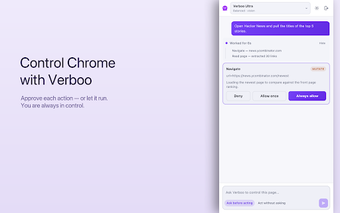
Verboo: a permission-aware AI side panel for automated browsing
Verboo, from Verboo Tecnologia, is an AI side panel in Chrome that automates repetitive browser tasks. It performs form filling, SERP data extraction, navigation, and tab grouping while showing each step in a visible side panel for monitoring or approval. Key safeguards include a per-tool safety gate with a policy engine, three permission modes, local MCP transport, and a zero-telemetry privacy model. Researchers, developers, and advanced users who need controlled automation and local data handling benefit most.
What Verboo targets and how it operates in the browser
Verboo is built to remove repetitive work while keeping the user in control. The extension runs as a side panel inside Chrome and uses AI-driven automation for navigation, clicking, typing, web research, and extracting data from search results. Actions are visible in the panel so users can monitor sequence steps, and the tool groups tabs automatically to support multi-step research workflows without running code from remote servers.
How it treats privacy, permissions, and safety
Privacy and safety are enforced at multiple layers rather than assumed. The extension uses a zero-telemetry approach and does not read browsing history, and it stores per-site permission grants locally without syncing. A per-tool safety gate checks API calls against a policy engine, and three permission modes, Manual, Auto, and Skip, let users choose how often the app requests approval before performing actions.
Resource behaviour and impact on heavy browsing sessions
Verboo handles tab-heavy workflows while avoiding remote execution. Intelligent tab management and automatic grouping help organize research across many pages. All scripts run from the extension bundle, so no remote code execution occurs; this reduces external network dependencies. The extension requires a Verboo account session to operate, which simplifies token handling but ties activity to a signed session during use.
Fit for developers and integration with existing workflows
The tool supports developer-oriented workflows through local transport and ecosystem ties. Local MCP transport keeps sensitive tokens off the extension and integrates with the broader Verboo ecosystem, which suits scripted developer tasks and CRM-related automation. Availability requires a Chromium browser that supports the Side Panel API, and because permissions are stored locally and not synced, replicating the same configuration across multiple machines requires manual setup.
A controlled automation choice for privacy-conscious task specialists
Verboo is a pragmatic option for users who need visible, permission-led automation inside Chrome and prioritize local data handling. It favors on-device safeguards and explicit approvals over transparent cross-device convenience, so anyone who expects identical settings across multiple machines should anticipate extra setup steps. For research and developer workflows that value control and safety, Verboo offers a predictable, locally managed approach.